 Learn hubBlog
Break down COIN DEPTH INDEX — the whole order book as one number from −100 to +100, and three weighting methods.
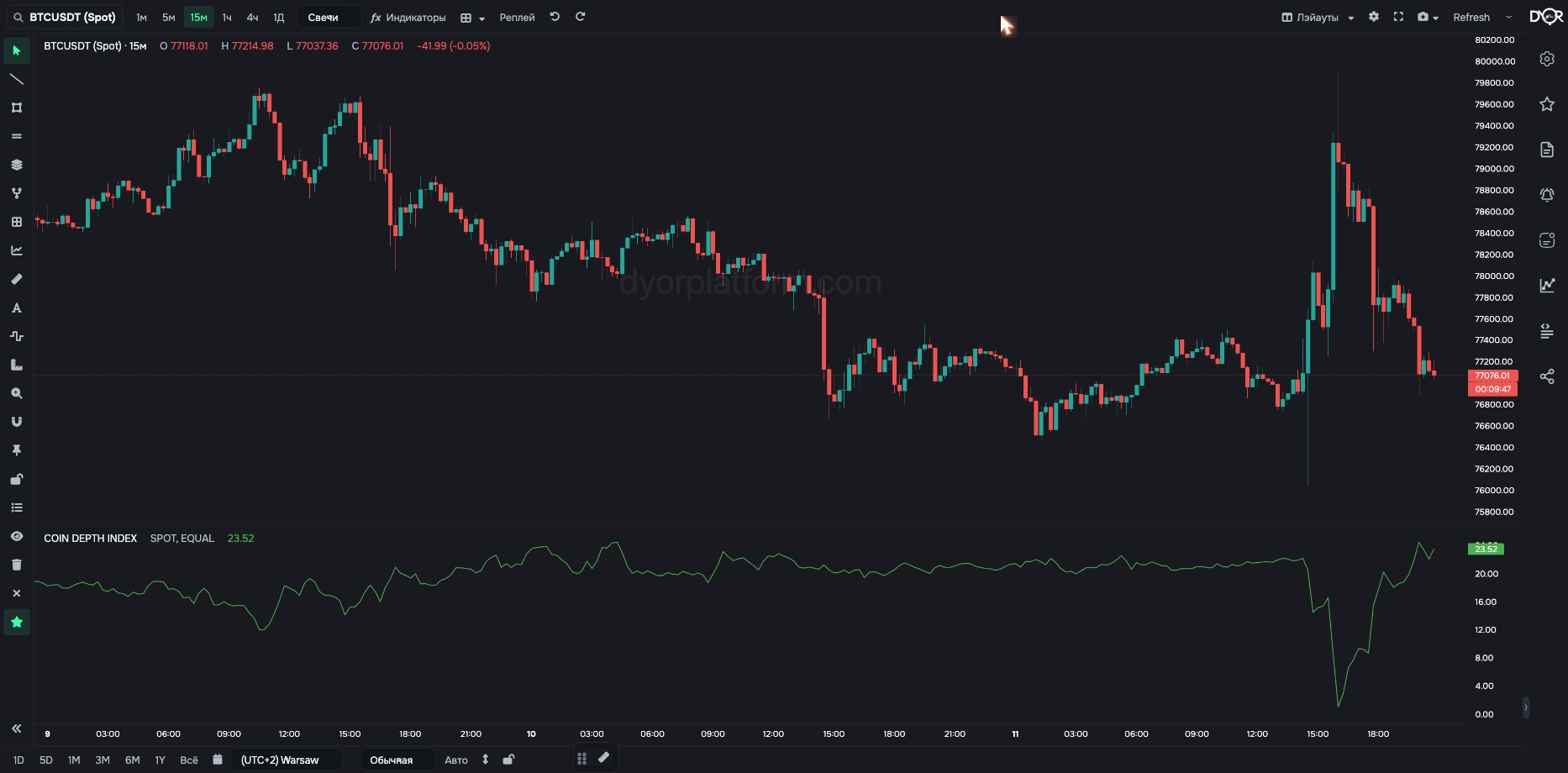
The whole order book in one number from −100 to +100.
How it's calculated:
Answer with one number which side is heavier across the whole order book, and by how much. The number is comparable across coins, so one condition works for all of them. The Weighting setting picks what matters more: near money or far money.
For example.
| Field | Options | Default | What it changes |
|---|---|---|---|
| Market Type | SPOT FUTURES | SPOT | Whose order book to count: Binance spot or futures market. - Want the orders of those who buy the coin itself — SPOT. - Want the orders of those who trade with leverage — FUTURES. On Coinbase and Hyperliquid the switch has no effect: Coinbase is spot only, Hyperliquid is futures only, the value is set by the exchange automatically. |
| Weighting | EQUAL NEAR FOCUSED BY VOLUME | EQUAL | The weight of each shell: EQUAL — all equal. NEAR FOCUSED — near ones matter more, weight = 1 ÷ depth. BY VOLUME — weight by the shell's volume. - Want each shell to be one vote, regardless of the money in it — EQUAL. - Want the skew right next to price — NEAR FOCUSED: it mostly counts the shell up to 1.5%, which weighs 40 times more than 30–60%. Plus — more bids below price, minus — more asks above price. - Want the skew by money across the whole book — BY VOLUME. |
| BTC Pairs | ALL USDT ONLY | ALL | Works only on Binance and only for BTC. ALL — the sum of three pairs: BTCUSDT + BTCUSDC + BTCFDUSD. USDT ONLY — the BTCUSDT pair only. For other Binance coins the data is always for the USDT pair; the parameter changes nothing. No effect on Coinbase and Hyperliquid: bitcoin has a single pair there — BTC/USD and BTC/USDC. - Want all of Binance bitcoin — ALL. - Want to compare with a source that counts only BTCUSDT — USDT ONLY. |
| Exchange | Chart Binance Coinbase Hyperliquid | Chart | Which exchange to take data from: Chart — the same one as the chart. Binance — spot and futures, USDT pairs. Coinbase — spot only, USD pairs. Hyperliquid — perpetual futures only, USDC pairs. Coinbase and Hyperliquid are available on paid plans (“Exchanges” screen). They have candles, trades and the order book. Derivatives, liquidations and loans show “no data” for them. - Want to compare one coin across exchanges — add the indicator several times and pick a different exchange in each. |
Metric COIN DEPTH INDEX. Condition fields:
“BTC pairs” appears only when the coin is BTC.
TOTAL DEPTH INDEX — the same thing summed over the market. Fields: Market Type, Total Type, Weighting. In alerts — the TOTAL DEPTH INDEX metric. Also available as a source in the Metrics Builder.
DEPTH INDEX cuts the order book into shells between depths. In each it computes (bid − ask) ÷ (bid + ask) and averages. +100 — bids only, −100 — asks only, 0 — equal. Weighting sets which shells matter more: all equal, the near ones, or by volume.
COIN DEPTH INDEX = +100 means…
Correct answer: All shells hold only bids