 Learn hubBlog
Match each indicator to its alert metric and condition fields.
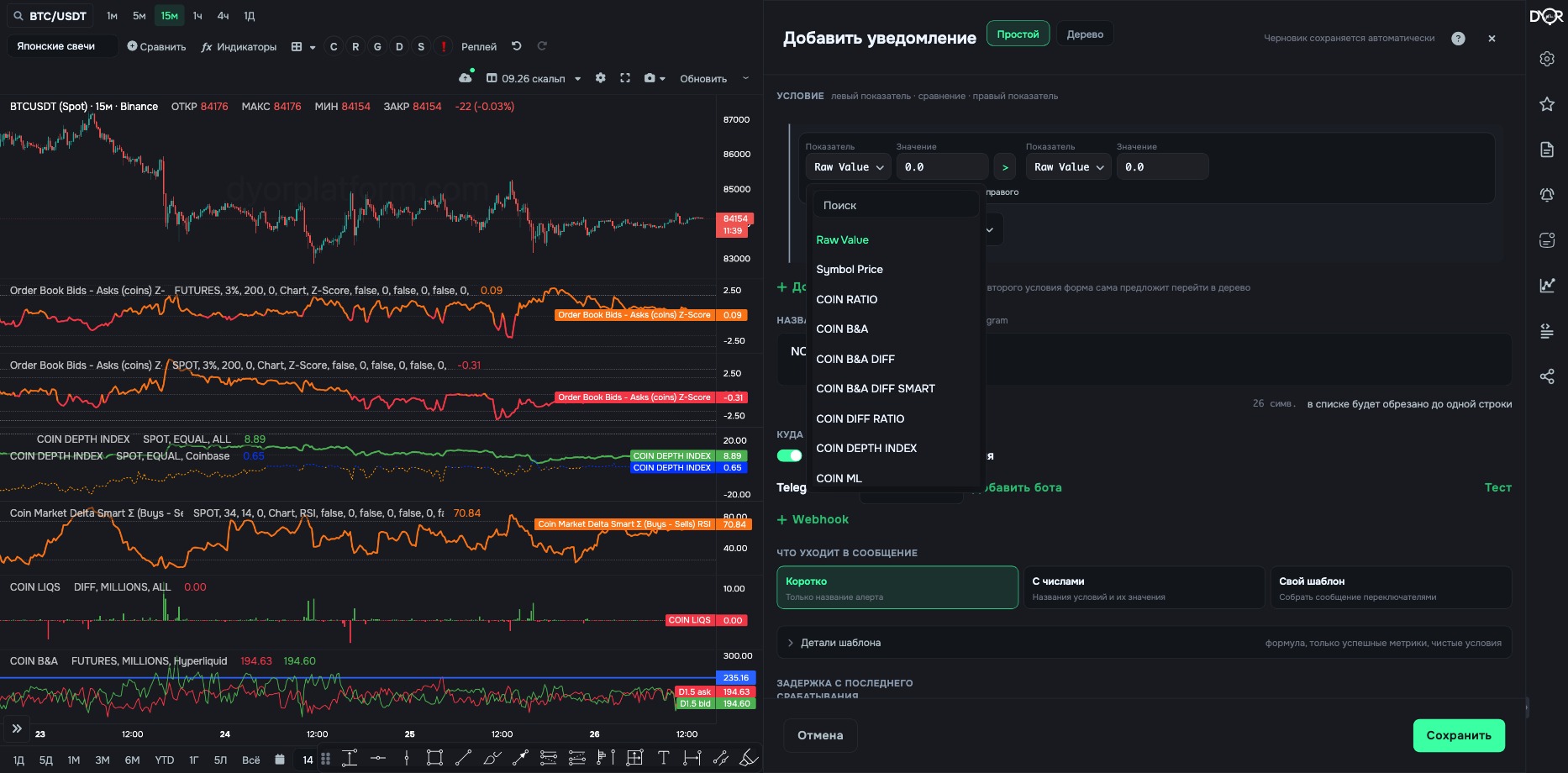
One rule: an alert metric has the same name as the indicator on the chart and repeats its parameters. COIN metrics always have three more fields: Coin, Market Type and Timeframe (1m / 5m / 15m / 1h / 4h / 1d). For order book and trades metrics, picking BTC as the coin adds BTC pairs. TOTAL metrics have no Coin — only Market Type and Timeframe, and market-wide liquidations and long/short don't have Market Type either. No alert metric lets you choose the exchange: Binance / Coinbase / Hyperliquid. Summary table:
| Indicator | Alert metric | Condition fields |
|---|---|---|
| COIN RATIO / TOTAL RATIO | COIN RATIO / TOTAL RATIO | Delta Percentage, Primary Target. TOTAL also has Total type. COIN with BTC as the coin also has BTC pairs. |
| COIN B&A / TOTAL B&A | COIN B&A / TOTAL B&A | COIN: Delta Percentage, Ask/Bid Type, Value Output Type. TOTAL: Delta Percentage, Ask/Bid Type, Total type — no Value Output Type. COIN with BTC as the coin also has BTC pairs. |
| COIN B&A DIFF / TOTAL | COIN B&A DIFF / TOTAL B&A DIFF | Delta Percentage. TOTAL also has Total type. COIN with BTC as the coin also has BTC pairs. |
| COIN B&A DIFF SMART / TOTAL | … DIFF SMART | Two sides, two depths, an operation. TOTAL also has Total type. COIN with BTC as the coin also has BTC pairs. |
| COIN DIFF RATIO / TOTAL | COIN DIFF RATIO / TOTAL DIFF RATIO | Diff Ratio Operation. TOTAL also has Total type. COIN with BTC as the coin also has BTC pairs. |
| COIN DEPTH INDEX / TOTAL DEPTH INDEX | COIN DEPTH INDEX / TOTAL DEPTH INDEX | Weighting. TOTAL also has Total type. COIN with BTC as the coin also has BTC pairs. |
| TOTAL AVG | TOTAL AVG | Timeframe, Delta Percentage, Market Type, Total type. |
| ASK BID ANOMALIES | ASK BID ANOMALIES | Ask/Bid Type, Norm window. |
| COIN TRADES | COIN TRADES | Buy/Sell, Value Output Type. COIN with BTC as the coin also has BTC pairs. |
| COIN TRADES Q. | COIN TRADES Q. | Buy/Sell. SPOT only. COIN with BTC as the coin also has BTC pairs. |
| CUM TRADES · CUM S. TRADES Q. | — | Not available in alerts. |
| MARKET DELTA SMART (COIN / TOTAL) | COIN / TOTAL MARKET DELTA SMART | Last Bars, Normalization Mode. TOTAL also has Total type. COIN with BTC as the coin also has BTC pairs. |
| BINANCE COIN OI / OI DELTA / TOTAL | BINANCE COIN OI / OI DELTA / TOTAL OI / TOTAL OI DELTA | COIN: Contracts (ALL / USDT ONLY), Units ($M / COINS) — the same Contracts and Units as on the chart. TOTAL OI and TOTAL OI DELTA: Timeframe only. |
| LONG/SHORT RATIO / TOTAL | LONG/SHORT RATIO / TOTAL … | Source. COIN: FUTURES only. TOTAL has no Market Type. |
| LONG/SHORT SIZE / TOTAL | LONG/SHORT SIZE / TOTAL … | Source, Output (LONG / SHORT / DIFF). |
| FUNDING RATE · PREDICTED | BINANCE COIN FUNDING RATE / PREDICTED FUNDING RATE | Market Type, Coin, Timeframe. |
| AGG. FUNDING | AGG. FUNDING | Values Type, Funding Type. |
| COIN LIQS / TOTAL BINANCE LIQS | COIN LIQS / TOTAL BINANCE LIQS | COIN: Liquidations Type, Units. FUTURES only. TOTAL: only Timeframe and Liquidations Type. |
| AGG. LIQUIDATIONS | AGG. LIQUIDATIONS | Timeframe, Liquidations Type. |
| COIN ML / TOTAL ML | COIN ML / TOTAL ML | ML Metric, Cumulative Delta Mode. SPOT only. |
| ML STABLECOIN | ML STABLECOIN | Stablecoin, ML Metric, Cumulative Delta Mode. |
| ETF FLOWS | — | Not available in alerts. |
| MSI | COIN MSI | Strategy, Direction. COIN with BTC as the coin also has BTC pairs. |
| Coin price / market index | Symbol Price | Market Type (SPOT, FUTURES or INDEX), Coin. |
| Metrics Builder | Composite metric | Source, field, indicator, parameters. The “Exchange” field here is the market type, Spot or Futures. Total sources have Total type, including OTHERS and TOTAL (-STABLE). Bitcoin has BTC pairs. |
| Two metrics | Metric pair | Metric A, Metric B, Operation, Normalization, Window. |
An alert metric is named like the indicator on the chart and repeats its parameters. Plus there are always Coin, Market Type and Timeframe. Whatever isn't in the list — OI, funding, market cap — comes in through “Composite metric”. CUM TRADES and ETF FLOWS can't be used in alerts.
How do you set an alert on a coin's market cap?
Correct answer: Via “Composite metric” as the metric, with Market Cap as the source