 Learn hubBlog
Learn COIN B&A: how much money sits in bids and asks at each depth and how to turn on the other depths.
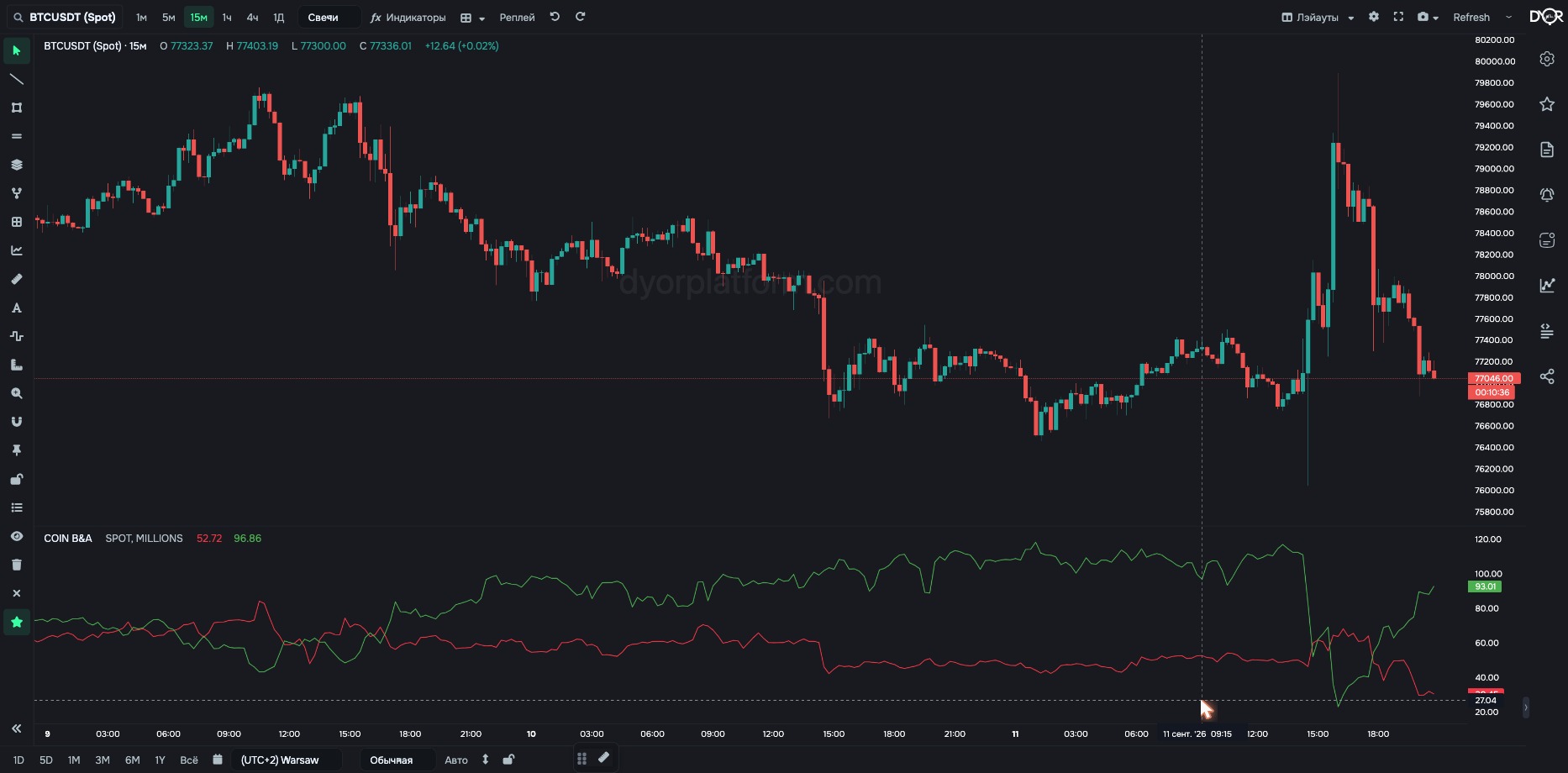
How much money sits in the order book to buy and how much to sell.
What it's based on: every minute the platform reads the exchange order book and sums orders per side within each depth.
How to read it: D3 bid = 90 — buy orders from the price down to −3% hold $90M.
See the demand wall and the supply wall in dollars. Which side of the price holds more money, and by how much.
For example.
| Field | Options | Default | What it changes |
|---|---|---|---|
| Market Type | SPOT FUTURES | SPOT | Which order book to use: Binance spot or futures. - Want orders from people buying the coin itself — SPOT. - Want orders from people trading with leverage — FUTURES. On Coinbase and Hyperliquid the switch has no effect: Coinbase is spot only, Hyperliquid is futures only; the value follows the exchange automatically. |
| Currency | MILLIONS COINS | MILLIONS | Units: millions of dollars or number of coins. - Want to compare coins with each other — MILLIONS. - Want to see volume in the coin itself, regardless of its price — COINS. |
| BTC Pairs | ALL USDT ONLY | ALL | Works only on Binance and only for BTC. ALL — the sum of three pairs: BTCUSDT + BTCUSDC + BTCFDUSD. USDT ONLY — the BTCUSDT pair only. For other Binance coins, data is always for the USDT pair; the input changes nothing. No effect on Coinbase and Hyperliquid: Bitcoin has one pair there — BTC/USD and BTC/USDC. - Want all of Binance's Bitcoin — ALL. - Want to compare with a source that counts only BTCUSDT — USDT ONLY. |
| Exchange | Chart Binance Coinbase Hyperliquid | Chart | Which exchange to take data from: Chart — the same one as the chart. Binance — spot and futures, USDT pairs. Coinbase — spot only, USD pairs. Hyperliquid — perpetual futures only, USDC pairs. Coinbase and Hyperliquid are available on paid plans (the “Exchanges” screen). They have candles, trades and order book. Derivatives, liquidations and loans show “no data” for them. - Want to compare one coin across exchanges — add the indicator several times and pick a different exchange in each. |
By default one depth is visible — 3%. Turn on the other depths in the Style tab: tick the line you need.
Metric COIN B&A. Condition fields:
“Value Output Type” — Millions, Coins or Raw $ (dollars not divided by a million). “BTC pairs” appears only when the coin is BTC.
TOTAL B&A — the same summed across the whole market. Adds the Total Type field.
COIN B&A is the money in the order book by side. Each of the seven depths has two lines, bid and ask, in millions of dollars or in coins. The 3% depth is visible by default. Turn on the others with checkboxes in the “Style” tab.
The “D3 bid” line shows…
Correct answer: The sum of buy orders within 3% below the price
D3 bid = 90, D3 ask = 40. To push the price down 3%, sellers have to “eat”…
Correct answer: $90M — all bids within 3%