Goal
Understand which exchange the data comes from, how the four exchanges differ and what each one has and lacks.
The platform’s data comes from four exchanges. By default everything is from Binance.
| Exchange | What trades | What DYOR has |
|---|
| Binance | Spot and futures, USDT pairs | All platform data. |
| Coinbase | Spot only, USD pairs | Order book, trades, heatmap and limit orders.
No derivatives — it is spot. |
| Hyperliquid | Perpetual futures only, USDC pairs | Order book, trades, OI, funding and its forecast, liquidation map.
Funding is charged every hour. |
| Deribit | Perpetual futures to USDC, about 100 contracts | Order book, trades, OI, funding and forecast, liquidations, heatmap, limit orders, liquidation map.
The main options exchange.
Funding per hour. |
On Deribit BTC and ETH trade in two contracts:
- BTC/USD — inverse: collateral and result in the coin itself. This is the main contract.
- BTC/USDC — linear: collateral in USDC, as on Binance and Hyperliquid.
The pairs are not added together: each contract has its own data.
Where to find it
- Nothing needs enabling. All four exchanges are available on paid plans and only in Workspace V2.
- Coin search → exchange filter: All exchanges, Binance, Coinbase, Hyperliquid, Deribit. With an exchange selected, the ticker in the list has no prefix: BTC/USDC. On the chart it gets the prefix: HYPERLIQUID:BTC/USDC.
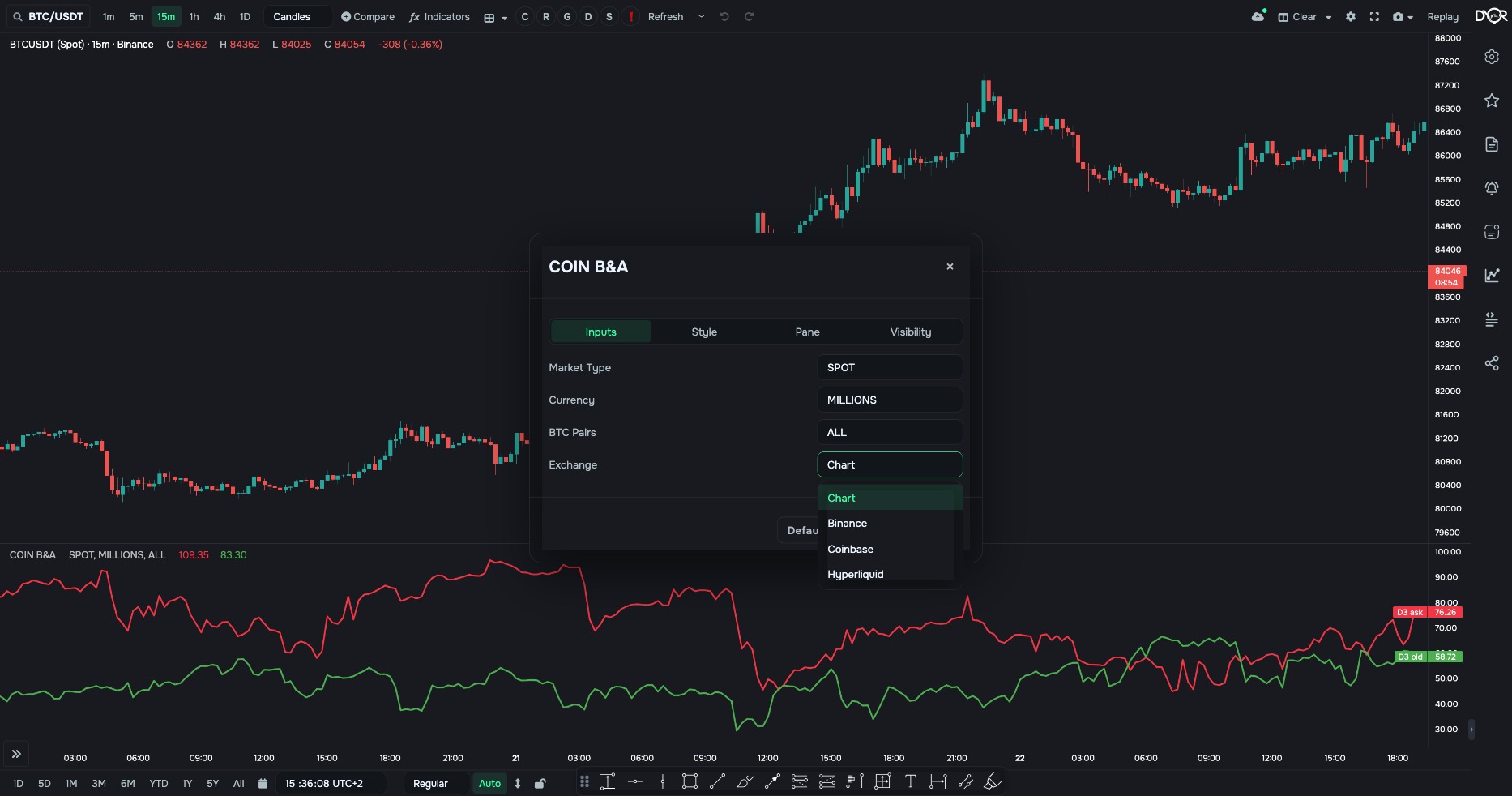
- A COIN indicator has the Exchange: Chart / Binance / Coinbase / Hyperliquid / Deribit. The default is Chart — the same exchange as the chart. The list holds only exchanges that have data for this indicator. Without a subscription there is no field.
- TOTAL indicators and market-wide ones have the Exchange field too, but the default there is Binance, not the chart’s exchange.
Example. Open a Binance BTC/USDT chart and add three COIN B&A. Pick a different exchange in each. You get three order books of one coin on one screen.
COIN B&A → gear → Inputs → Exchange: Chart, Binance, Coinbase, Hyperliquid, Deribit
1Which data each exchange has
| Data | Binance | Coinbase | Hyperliquid | Deribit |
|---|
| Order book: B&A, DIFF, RATIO, DEPTH INDEX, TOTAL versions, ASK BID ANOMALIES | ✓ | ✓ | ✓ | ✓ |
| Trades: TRADES, CUM, MARKET DELTA SMART, MSI, TOTAL TRADES | ✓ | ✓ | ✓ | ✓ |
| Heatmap and limit orders on the chart, limit alerts | ✓ | ✓ | — | ✓ |
| OI, OI DELTA, FUNDING RATE, PREDICTED, TOTAL OI, AGG. FUNDING | ✓ | — | ✓ | ✓ |
| LONG/SHORT RATIO and SIZE | ✓ | — | — | — |
| COIN LIQS, TOTAL LIQS | ✓ | — | — | ✓ |
| Liquidation map | ✓ | — | ✓ | ✓ |
| Margin lending | ✓ | — | — | — |
| Options | ✓ | — | — | ✓ |
| COINBASE PREMIUM | ✓ | ✓ | ✓ | ✓ |
An indicator with no data on the chart’s exchange is not offered in the indicators window. One already on the chart shows “no data”.
What differs in the settings
- Market (SPOT / FUTURES) does nothing: Coinbase has one market — spot, Hyperliquid and Deribit — futures. The platform sets the value itself.
- BTC pairs does nothing. On Coinbase and Hyperliquid Bitcoin has one pair. On Deribit two, but they are not added together.
- Hyperliquid and Deribit funding is a rate per 1 hour, and the legend says so. Divide the thresholds you are used to from Binance by 8. AGG. FUNDING converts by itself: it multiplies the hourly rate by 8.
- Hyperliquid provides only 20 order book levels per side. So the heatmap and limit orders are not built for it, and the 30% and 60% depths exist only for some coins.
Data history
- Order book and trades for Coinbase and Hyperliquid — from 11 September 2026, Deribit — from 1 October 2026.
- Hyperliquid OI: daily from June 2023, hourly and 4h — about 180 days, minute — from 1 October 2026. Deribit OI for BTC/USD and ETH/USD: daily from February 2020, for USDC contracts — from 1 October 2026. History before 1 October is taken from Coinglass.
- Hyperliquid funding — from May 2023, Deribit — from 2019.
- The Hyperliquid and Deribit liquidation maps accumulate from 1 October 2026: longer intervals open up as history builds.
Takeaway
By default all data is from Binance. Coinbase is spot only, Hyperliquid and Deribit are futures only; all three are available on paid plans and only in Workspace V2. Order book and trades exist everywhere. Derivatives — on Binance, Hyperliquid and Deribit; liquidations, heatmap and limit orders — on Binance, Coinbase and Deribit; long/short and loans — only Binance. The “Exchange” field of a COIN indicator picks the exchange separately from the chart; on TOTAL the default is Binance.
Quick check
What's available for Hyperliquid in Workspace V2?
- Order book, trades, OI, hourly funding and the liquidation map
- Heatmap and limits on the chart
- Liquidations, long/short and loans
Show answer
Correct answer: Order book, trades, OI, hourly funding and the liquidation map
 Learn hubBlog