 Learn hubBlog
Break down COIN LIQS — forced position closes for a coin per bar: longs, shorts, the difference.
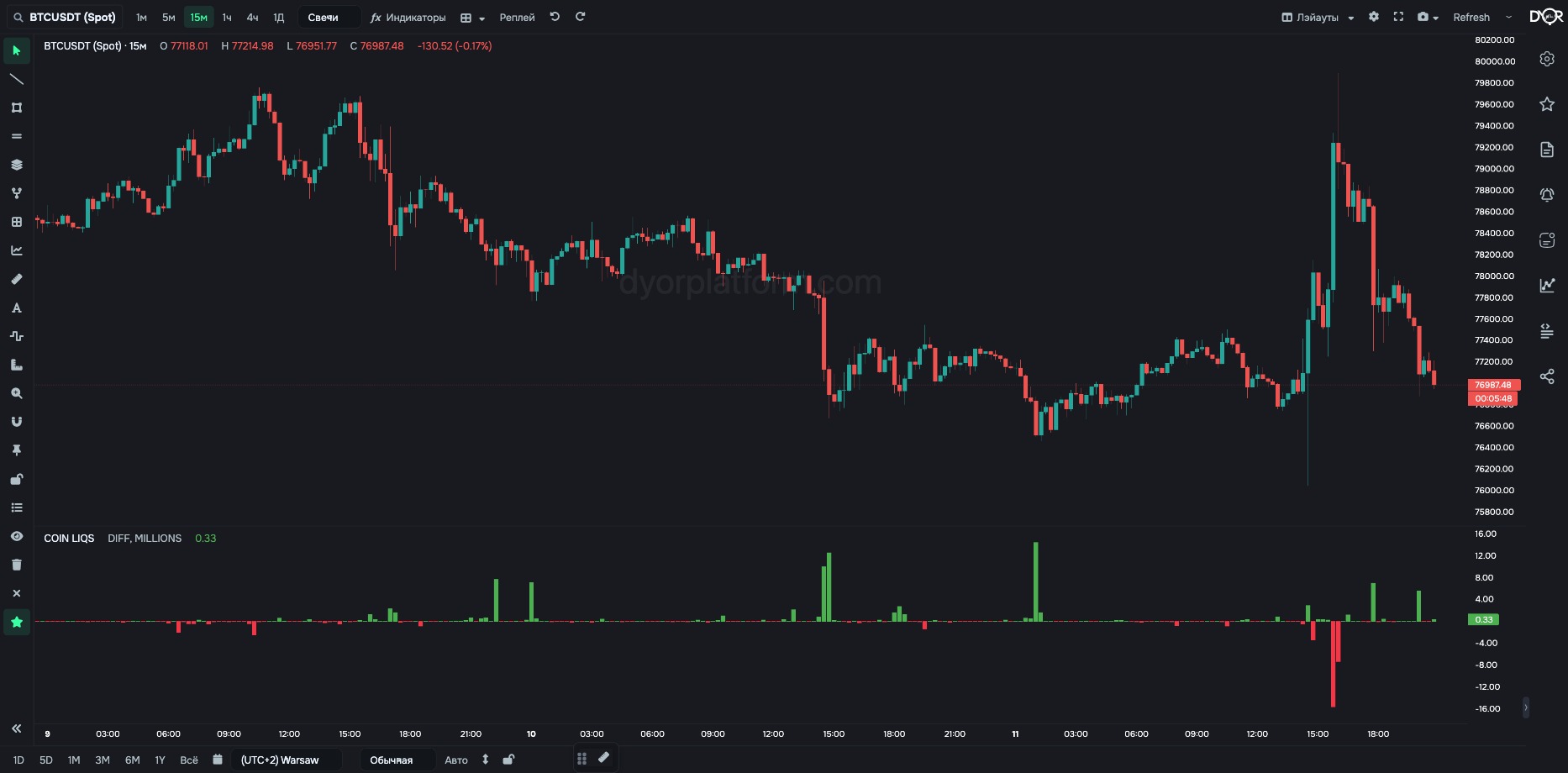
Forced position closes on Binance futures for the coin, per bar.
What it is. When a leveraged position runs out of margin, the exchange closes it itself with a market trade. That is a liquidation.
See forced trades. A liquidated long is a market sell nobody planned. A liquidated short is the same kind of buy.
For example.
An abnormal liquidation spike after a big drop is often a pause in selling: the forced sellers got flushed out, there is no one left to push. A pause is not a reversal: by our data, the day after such a flush is flat on average, not rising. There is no mirror on rallies — after shorts get flushed, the rise usually continues.
| Field | Options | Default | What it changes |
|---|---|---|---|
| Long Short Type | LONG SHORT DIFF | DIFF | What to show: long liquidations, short liquidations or their difference (longs − shorts). - Want both sides as one line — DIFF: above zero means more longs got flushed. - Want one side — LONG or SHORT. |
| USDT Format Type | RAW THOUSANDS MILLIONS | MILLIONS | Units: dollars, thousands or millions of dollars. MILLIONS — for BTC and large coins. THOUSANDS or RAW — for small coins, where millions show only zeros. |
| BTC Pairs | ALL USDT ONLY | ALL | Works only on Binance and only on BTC. ALL — the sum of three pairs: BTCUSDT + BTCUSDC + BTCFDUSD. USDT ONLY — the BTCUSDT pair only. For other Binance coins the data is always for the USDT pair, the parameter changes nothing. Has no effect on Coinbase and Hyperliquid: bitcoin has a single pair there — BTC/USD and BTC/USDC. - Want all of Binance bitcoin — ALL. - Want to compare with a source that counts only BTCUSDT — USDT ONLY. |
Metric COIN LIQS. Condition fields:
Market Type — FUTURES only.
TOTAL BINANCE LIQS — total liquidations across all Binance futures. Same settings.
COIN LIQS — liquidations that already happened on Binance futures, per bar. A long liquidation hits the order book as a market sell, a short liquidation as a buy. Long Short Type picks longs, shorts or their difference. Units — dollars, thousands, millions.
A COIN LIQS spike in LONG mode means…
Correct answer: Many longs were force-closed on this bar
A long liquidation is…
Correct answer: A forced market sell