
DYORLearn hubBlog
Home / Learn hub / Screeners

Ready-made screeners

7 min · DYOR Education
Free“Screeners” section
Goal

Cover the “Screeners” page: four tabs and what each part of every table means.

What it shows

Tables across all Binance coins at once. The list rebuilds itself; the “Updated Ns ago” label shows when the data arrived. Four tabs: Market Depths and Screener V2 are available on the trial too, Screener V3 and Minerva — subscription only. Below is each tab separately: a screenshot and what each part of it means.
1Market Depths
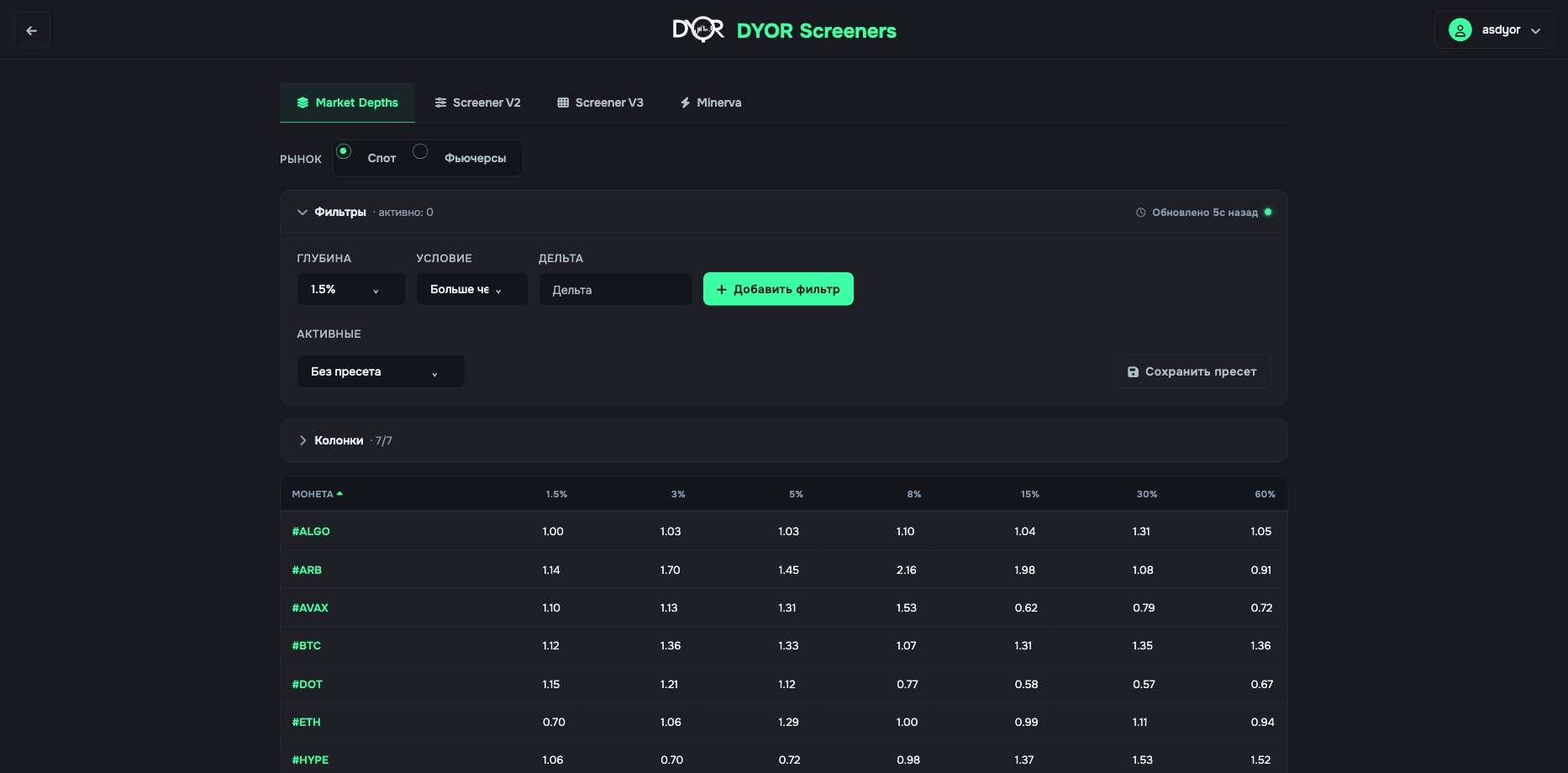
Market Depths tab: a row is a coin, columns are bid ÷ ask at seven depths

A row is a coin. Columns are seven depths: 1.5%, 3%, 5%, 8%, 15%, 30%, 60%. Each cell holds bid ÷ ask at that depth, the same number as COIN RATIO on the chart: 1 — equal, 1.5 — one and a half times more bids, 0.7 — more asks.
  • Market — Spot or Futures: whose order book to count.
  • Filters — depth band, a “Greater than / Lower than” condition and a number. The filter “1.5% greater than 1.3” keeps coins where, right at the price, bids exceed asks by 30%. There can be several filters.
  • Columns — which depths to show, 7/7 by default.
  • Preset — a set of filters and columns, saved under a name.
2Screener V2
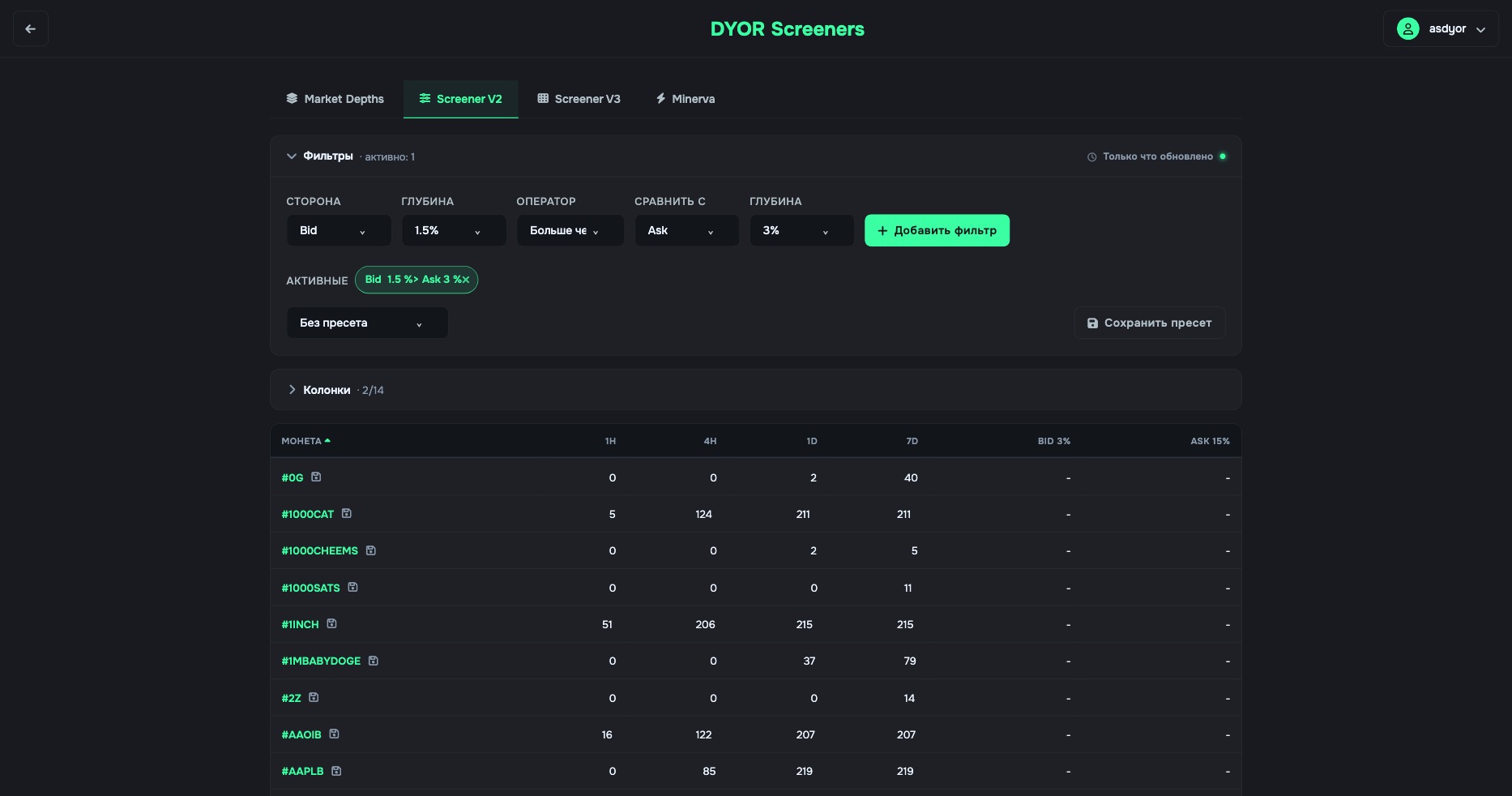
Screener V2 with the condition Bid 1.5% > Ask 3%: on the left, coins where the condition holds now; columns 1H–7D show how many times it fired

The condition compares two sides of the order book at two depths: Side · Band · Operator · Side · Band. “Bid 1.5% greater than Ask 3%” — bids within 1.5% exceed asks within 3%, the same anomaly as in COIN B&A DIFF SMART. The table lists coins where the condition holds right now.
  • 1H · 4H · 1D · 7D — how many times the condition fired for the coin over an hour, four hours, a day and a week. 0 / 0 / 2 / 40 — it used to fire often, now it's the first time today. 50 / 206 / 214 / 214 — it fires nonstop.
  • Next come the columns of the selected depths (Bid 3% and Ask 15% by default, 2/14): order volume at that depth.
  • There can be several conditions; they sit in the “Active” block and are removed with the cross.
3Screener V3
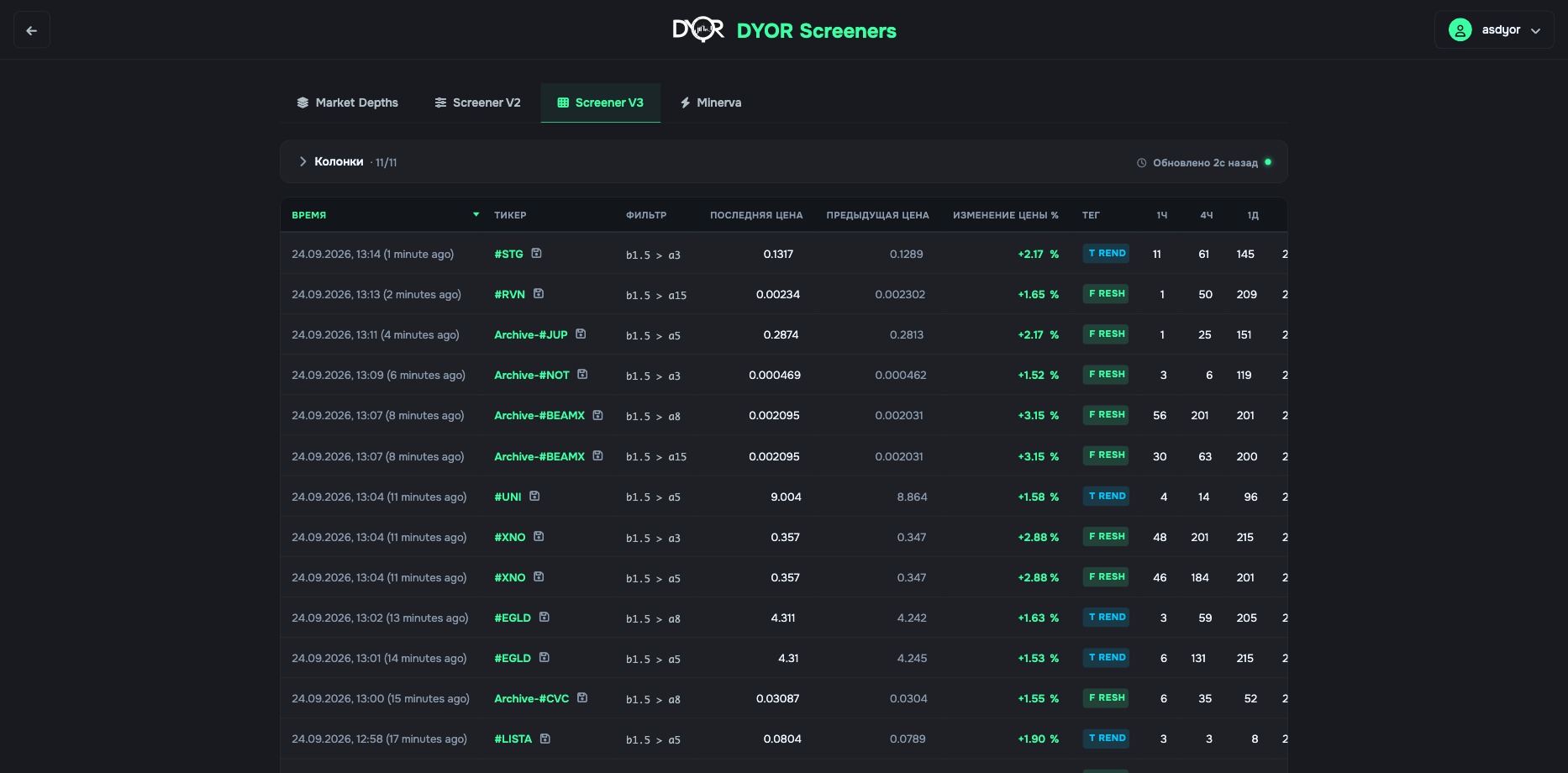
Screener V3: a feed of triggers across all pairs — time, ticker, filter, price then and now, tag, 1h–7d counters

Not a coin table but an event feed: each row is one trigger of one of the built-in order book filters for one coin. Newest on top, across all 900+ Binance pairs.
  • Timestamp — when it fired.
  • Coin Name — the coin; the button next to it opens its chart.
  • Filter Name — what fired: b1.5 > a8 reads “bids within 1.5% became larger than asks within 8%”. The first letter is the side, the number is the depth.
  • Previous Price — the price at the moment of the trigger. Last Price — the price now. Price Change % — the difference between them: what the price did after the signal.
  • Tag — FRESH or TREND: the signal status.
  • 1h · 4h · 1d · 7d — how many times this filter fired for this coin over the window. 1 / 1 / 6 / 20 — a rare event. 11 / 135 / 210 / 210 — it fires constantly, the signal is no news.
  • Clicking a row expands a summary: when the coin entered the feed, when the previous crossover was, how many crossovers there have been since and how the price changed between them.
4Minerva
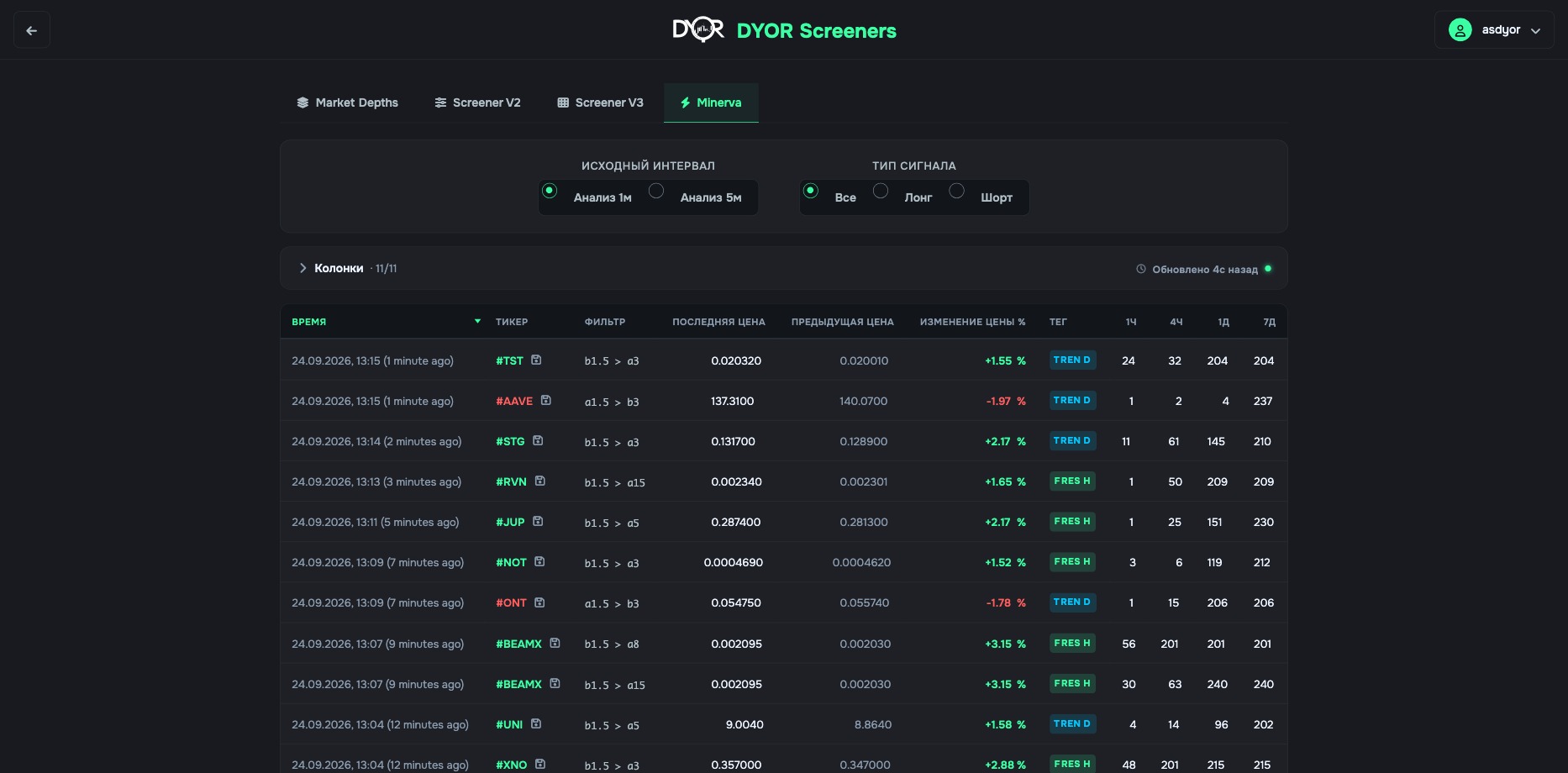
Minerva: the same feed for Minerva signals; at the top — source interval (1m / 5m) and signal type (all / long / short)

The same feed, but for Minerva signals — a fixed set of order book filters. The columns are the same as in V3. A green ticker is a long signal (b1.5 > a3: bids near the price exceed asks), a red one is short (a1.5 > b15: asks near the price exceed bids).

  • Source Interval — 1m Analysis or 5m Analysis: which data to look for the crossover in. 1m sees it earlier and fires more often, 5m — less often, only if the skew held.
  • Signal Type — All, Long, Short.
What it's for

Find which coins right now have what an indicator shows on a single chart. It's a search across the whole market, four ways.

For example.

  • Market Depths — compare order book skew across all coins at one depth: sort the 1.5% column, and the coins with the strongest demand near the price come to the top.
  • Screener V2 with the condition “Bid 1.5% greater than Ask 3%” — a table of coins that have that very DIFF SMART anomaly right now.
  • Screener V3 — when the filter fired for each coin and what has happened to the price since. The 1h–7d counters separate a rare event from a constant one.
  • Minerva — the same for Minerva signals, with a choice of long or short.
Where to find it

Main platform menu → Screeners. A separate page, not the chart rail. Tabs are at the top of the page.

Settings

Each tab has its own filters — covered above. Common to all: the Columns block (what to show), Preset (save a set of filters under a name), the “Updated” line (data freshness). The depths are the same as everywhere: 1.5 · 3 · 5 · 8 · 15 · 30 · 60%.

In alerts

You can't set an alert on the table itself. The table's condition is repeated in an alert with the same metrics for a specific coin. Need a notification across all coins at once — Screener Builder, the “Notify about new ones” button.

Try it yourself
  1. Open “Screeners” → Screener V2. Add the condition Bid 1.5% > Ask 3%.
  2. Open any coin from the list via the chart button and check its COIN B&A DIFF SMART.
What you should get. The screener found a coin, the chart confirmed it. Remove the condition with the cross in “Active”.
Takeaway

Screeners are tables across all coins at once. Market Depths — bid ÷ ask at seven depths for each coin. Screener V2 — coins where an order book condition holds now, plus 1h–7d trigger counters. V3 and Minerva — trigger feeds: time, filter, price then and now, tag, counters. V3 and Minerva are subscription only. You can't set an alert on a table; the table's condition is repeated in an alert with metrics for a specific coin.

Quick check

A row in Screener V3 is…

Show answer

Correct answer: One filter trigger for one coin

← Previous lesson Next lesson →
See these concepts live on real Binance data — the DYOR workspace is free to start.
Open DYOR Platform