Free“Screeners” section
Goal
Cover the Screener Builder: a query in plain words, the “How I understood the query” block, saving and Telegram notifications.
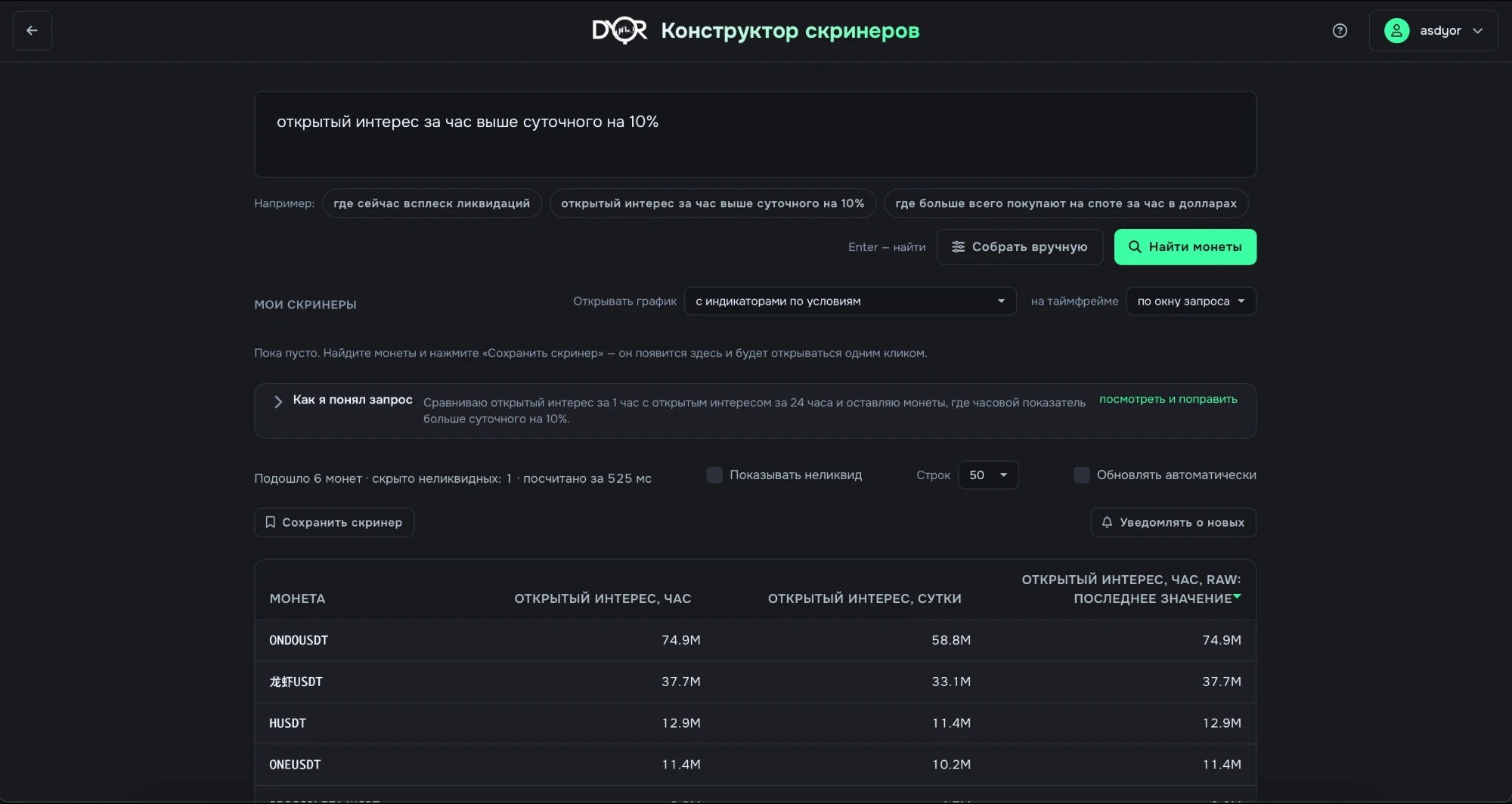
Screener Builder: a query in plain words, the “How I understood the query” line, how many coins matched, the “Save screener” and “Notify about new ones” buttons, the result table
What it shows
An AI assistant. You write in plain words what to find and what to show. It turns the phrase into conditions and searches all platform data.
- Over a hundred metrics are stored for every Binance coin: the order book at seven depths, trades, open interest, funding, liquidations, margin loans, market cap. They update once a minute.
- A query is an ordinary phrase. For example: “open interest over the hour is 10% above the daily one”. Three steps on screen: “Parsing the phrase” → “Got the query” → “Counting across every coin”.
- How the platform understood the phrase is shown in the “How I understood the query” block: metrics, windows, aggregations, conditions. Everything can be edited by hand, then “Recount”.
- Without the assistant — the Build by hand button. You pick each metric yourself, step by step, like an indicator on the chart: data source (order book, trades, open interest, liquidations, funding, loans) → its settings (Exchange Type, Depth %, Field) → aggregation, window, condition. To the left of the steps is the full metric list with search.
- The result is a table of coins that passed the conditions, with the chosen columns. Illiquid coins are hidden; turn them on with the “Show illiquid” checkbox.
- Found something interesting — two actions. Save screener — it appears in “My screeners” and opens in one click. Notify about new ones — save and watch: a Telegram message when a coin that wasn't there enters the results.
- Don't want to phrase it — “Or start with a ready one”: preset cards show the result right away. For example “Open interest ramp”, “Order book skew”, “Liquidation spike”, “Negative funding”.
There's no fixed list of filters. Any platform metric, any window, any condition and any combination of them. In words or by hand — it's the same screener.
What it's for
Find coins by a condition the ready-made screeners don't have, across the whole market at once. And don't sit over the table: Telegram will tell you about a new coin in the results.
For example.
- Task: where longs are getting wiped out right now while positions are being built. There's no ready-made screener for this, and on the chart you'd have to go through coins one by one.
- You build two metrics by hand. Long liquidations: sum over an hour, above the market's 90th percentile. Open interest: change over 4 hours, above 20%. Logic — “all conditions hold”.
- The result is coins where positions were built over four hours and longs just got wiped out. The metrics are the same as on the chart, only across all coins at once.
- “Notify about new ones” — from here the platform watches: a new coin in the results → a Telegram message.
Where to find it
Main menu → Screener Builder (the /screenerBuilder page).
- The “Describe what you are looking for” field → Find coins or Enter. Under the field there are three example phrases; a click fills one in.
- Build by hand — no phrase, straight to metrics and conditions.
- “Or start with a ready one” — presets. “My screeners” — saved ones.
Settings
- Metric — source and field. For example: Open interest → Open Interest. Each metric has two toggles: “in filtering” — it takes part in the condition; “as column” — it's shown in the table.
- Window aggregation — how to squeeze a metric's history into one number. Options: last value (Value / Raw), sum, avg, max, min, zscore, percentile_rank, change_percent, correlation. The window is a number and a unit: min / h / d, from 5 minutes to 90 days.
- Operator with a second metric — ratio, correlation, Spearman IC or Tail Edge. For Spearman IC and Tail Edge the second side is the futures price. The horizon is set with the words “after N bars”, and Tail Edge also has tails (20 / 80). Optionally — “stability: N windows” with a dead zone and neutral. The operations are the same as in the Metrics Builder.
- Condition — greater, less or a range. On the right: a number, another metric × k, a market percentile or the metric of a specific coin. The “Count frequency” checkbox — the share of bars where the condition held. Several conditions: “all conditions hold” or “any condition holds”.
- Add metric → Recount.
- Notify about new ones → the “Screener notification” dialog. Name. The “Notify about new coins” checkbox. Where to send — your personal Telegram bot; it's linked in the profile, and without it only the screener gets saved. How often — as soon as it shows up, at most once every 15 minutes, once an hour, once every 4 hours. Price filter — no filter; only when the price is above the previous signal; only when it's below. Webhook — optional, your own address for POST or GET.
- A saved screener has: copy, template link, chart marks, the bell — the same notification settings, delete. “Open chart” — clicking a coin opens the chart with indicators from the condition, on the timeframe from the query window or a chosen one.
- “Signal history” — which coins were in the results of saved screeners and when, with CSV export. Chart marks update once a minute; a mark's tooltip shows the screener's columns.
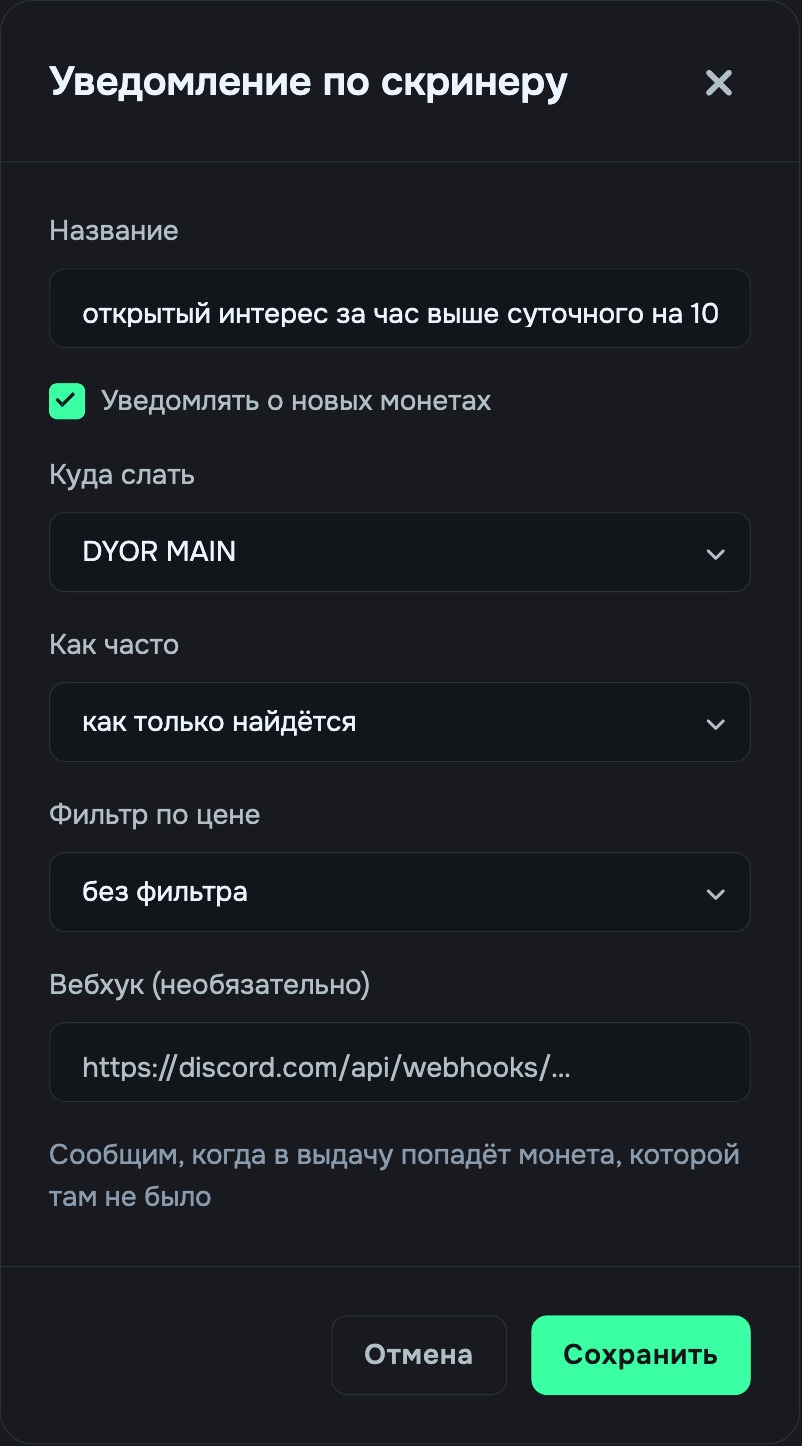
The “Screener notification” dialog: where to send, how often, price filter, webhook
In alerts
Right from the builder. Notify about new ones after a search, or the bell on a saved screener. The message comes to your personal Telegram bot or a webhook when a coin that wasn't there enters the results. Frequency — from “as soon as it shows up” to “at most once every 4 hours”. The price filter keeps only signals where the price is above or below the previous signal for that coin.
Takeaway
The builder is an AI assistant: a phrase in words → conditions on platform metrics → a table of coins. The translation is visible and editable in the “How I understood the query” block. The same screener can be built by hand: data source → its settings → aggregation, window, condition. Found something interesting — “Save screener” or “Notify about new ones”: Telegram will report every new coin in the results. Any metrics, windows and conditions, with no limits on combinations.
 Learn hubBlog