
DYORLearn hubBlog
Home / Learn hub / Alerts

Where alerts arrive

5 min · DYOR Education
FreeRight rail · Alerts
Goal

Cover delivery: your own Telegram bot, message text, chart marks, alert states and logs.
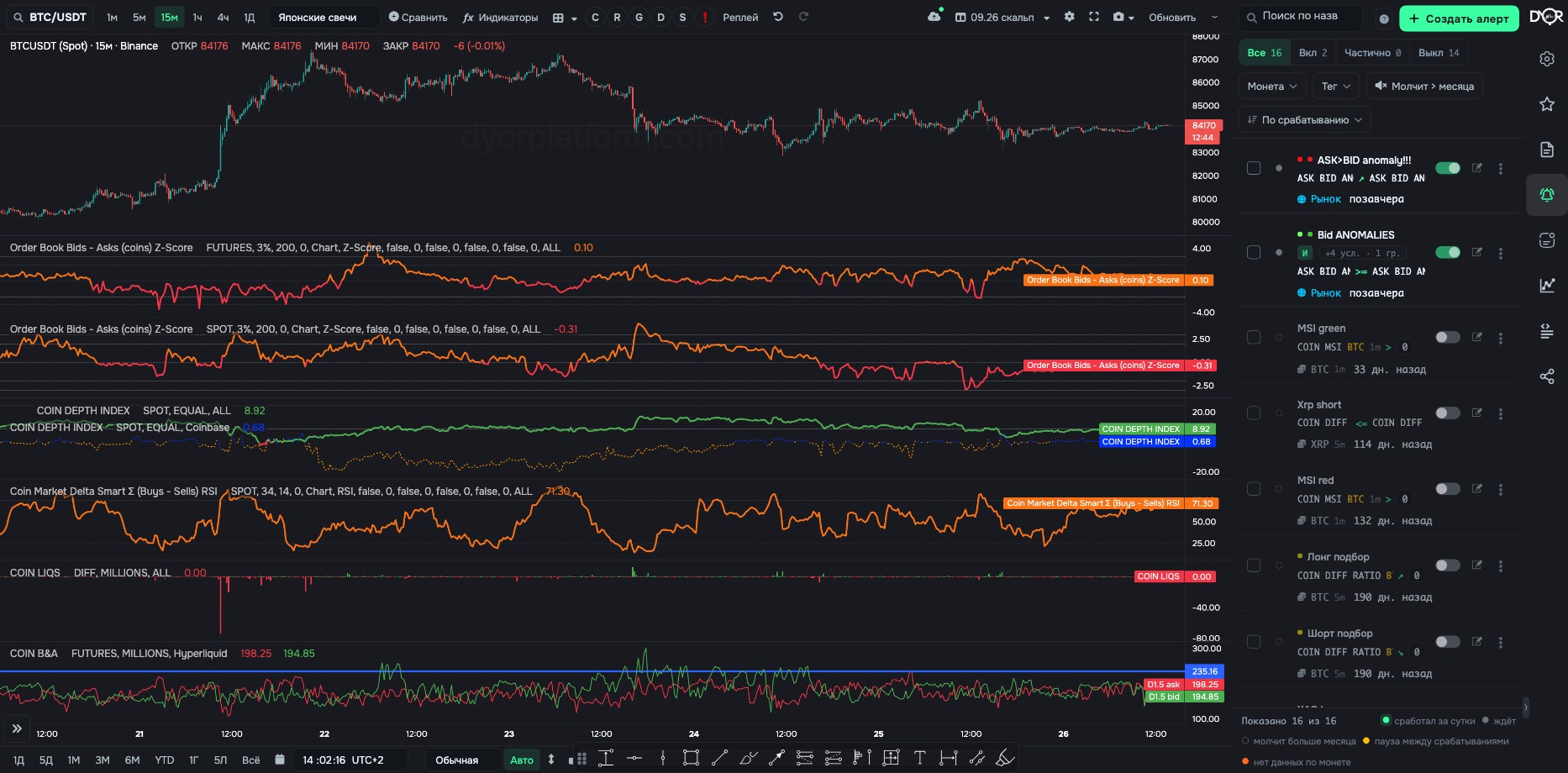
Alert list: All / On / Partial / Off segments, the state of each alert
Telegram

The platform sends messages not from a shared bot but from yours:

  1. create a bot with @BotFather in Telegram;
  2. copy its token (access key) and bot link to the platform's “Telegram Bots” page;
  3. press Start in the chat with the bot — without it the bot isn't allowed to message you first;
  4. in the alert, pick the bot in “Where to send” and press Test.
Message

The message text is the alert's Name. The “With numbers” mode adds the condition names and the actual values it fired at. A custom format — only via Webhook: URL + GET/POST.

Chart mark

Triggered alerts are drawn as circles under the candles. A circle has a symbol of up to two characters, a mark color and a text color. One bar — one circle, no matter how many times it fired.

States

In the list each alert has one of six: fired within a day · waiting · silent for over a month · pause between triggers · no data for the coin · turned off by you. The Partial segment — the alert is on, but some conditions inside it are off. Tags are colored dots and a filter in the list.

Clicking a state opens diagnostics: when it was checked, what holds right now, which condition is closest to firing — the current value, the threshold and how much is missing. It also shows why the alert is silent: the condition didn't hold, pause between triggers, subscription expired, no data for the coin, alert is off.

List
  • Search by name. Segments All / On / Partial / Off. Filters Coin, Tag, “Silent 30d+”. Sort by last triggered, by creation date, by name. Select several alerts to turn them on or off in bulk.
  • Row controls: toggle, edit, duplicate, logs, delete.
  • “Share” — a link or a JSON export. Whoever opens the link gets a copy of the alert in their own list; they set up the channels themselves.
  • An empty list shows two steps: connect a bot, then the first condition. Ready examples: breakout above level, sharp price drop, RSI oversold, volume spike.
Logs
  • “Messages Sent” — what was actually sent and when.
  • Metric value history — the numbers the condition works with.

Triggers but no messages — the problem is the bot, not the condition.

Try it yourself
  1. Open the alert list and click the state of any alert.
  2. Read what holds right now and which condition is closest to firing.
What you should get. You can tell why an alert is silent without opening its editor.
Takeaway

Messages come from your own bot. Create it with @BotFather, link the token on the “Telegram Bots” page, press Start. The message text is the alert name. Triggered alerts are marked with circles on the chart. Triggers but no messages — the problem is the bot, not the condition.

Quick check

The alert fires, but Telegram is empty. Where do you look?

Show answer

Correct answer: In the delivery channel: is the right bot selected and was Start pressed

← Previous lesson Next lesson →
See these concepts live on real Binance data — the DYOR workspace is free to start.
Open DYOR Platform